Atlassian Marketplace · Forge app

Your Atlassian bill
is overpaid by
$1,759 a month.

Recoup audits every seat across Jira, Confluence, JSM, and JPD. It finds the inactive accounts, the products no one's using, the JPD Creator seats sitting idle — and tells you exactly how much money is on the table. In dollars. Every scan.

Built for enterprises on the full Atlassian stack. The bigger your suite, the more we find.

30-day free trial · no credit card · install in under 60 seconds
SCAN #4271 · 14 MAY 2026 · 08:42

Org size 1,200 users
Scan duration 8 sec

INACTIVE USERS87 users
Jira (Standard)$710 / mo
Confluence$217 / mo
PRODUCT MISMATCHES142 users
Confluence dormant$612 / mo
JPD CREATOR WASTE22 users
→ Contributor (free)$220 / mo
SERVICE ACCTS PROTECTED14

TOTAL POTENTIAL SAVINGS
$1,759 / mo
= $21,108 / year reclaimed
RECEIPT FROM A REAL CUSTOMER SCAN — 1,200 USERS, JIRA + CONFLUENCE + JSM
Inside the app

What you'll see, first scan in.

Recoup ships as a Forge app — installs inside Jira, opens in the top nav, runs against your real Atlassian org. Here are the three screens you'll live in.
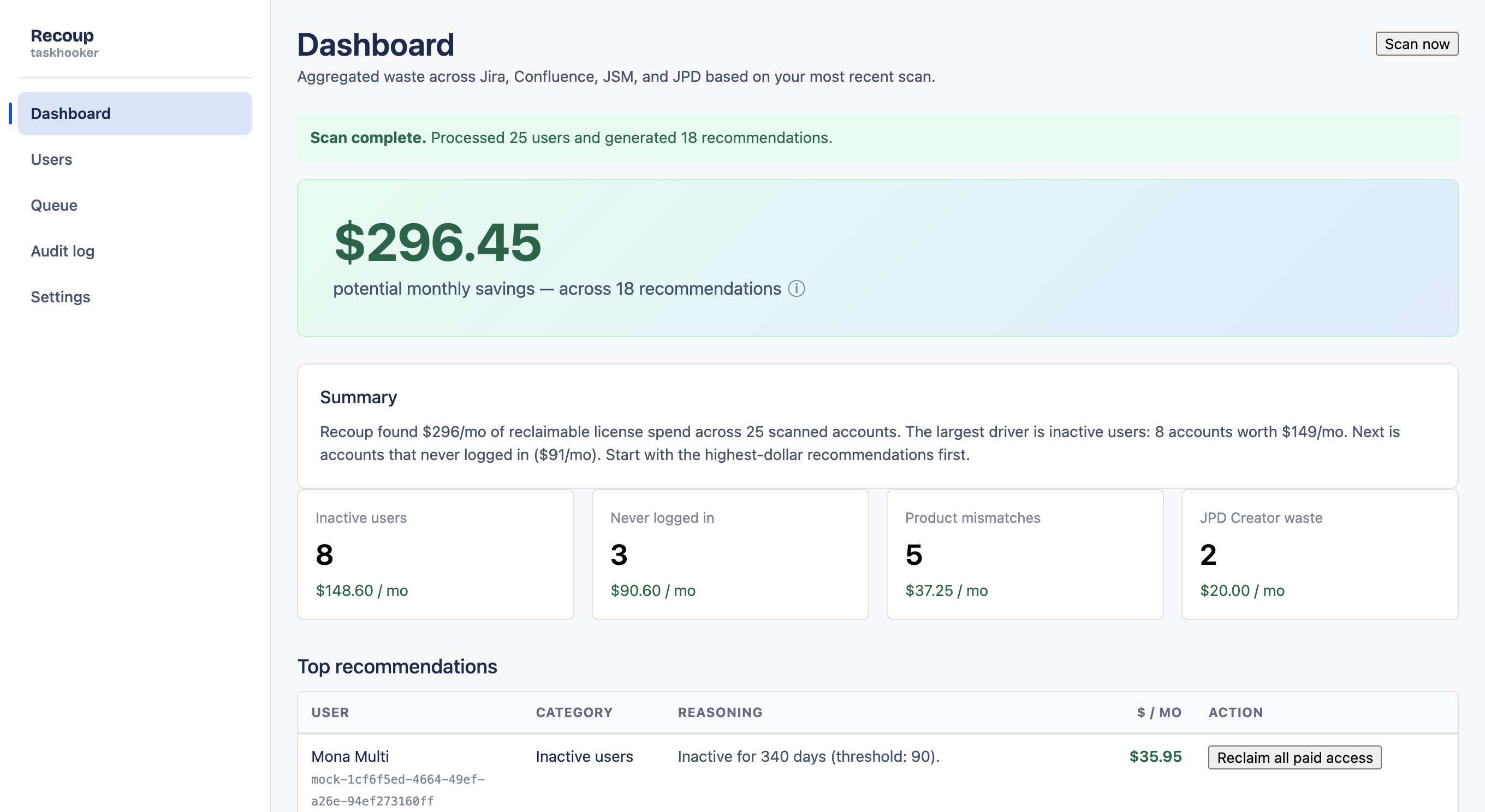
Recoup dashboard showing $296.45 monthly savings opportunity across 18 recommendations 1 Headline savings, every time. One number every finance lead understands. 2 Four waste categories. Click any card to drill into the users behind it. 3 Ranked recommendations. Sorted by dollar impact — work the top of the list first.
DASHBOARD — first surface after install
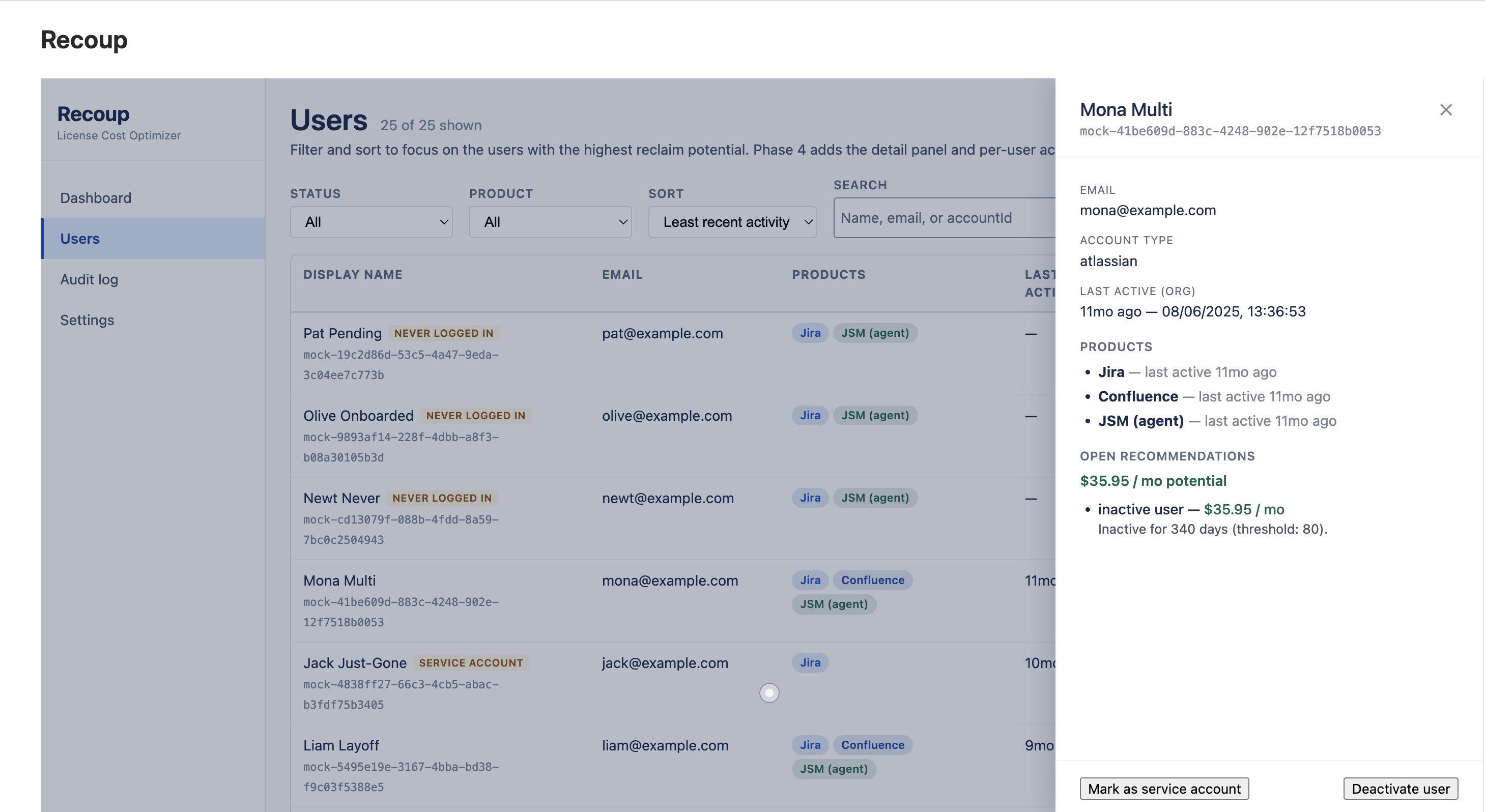
Recoup user detail panel showing per-product activity and reclaim recommendations 1 Activity per product. See which products are actually used and which aren't — the source of mismatch savings. 2 The recommendation, in dollars. Plain language, full reasoning, no jargon. 3 Reversible by design. Reclaiming a seat removes the user from their mapped Jira access group — fully reversible with one-click Add back. Mark as service account is one-click too. Reclaim requires a typed reason.
USER DETAIL — drill in, decide, document
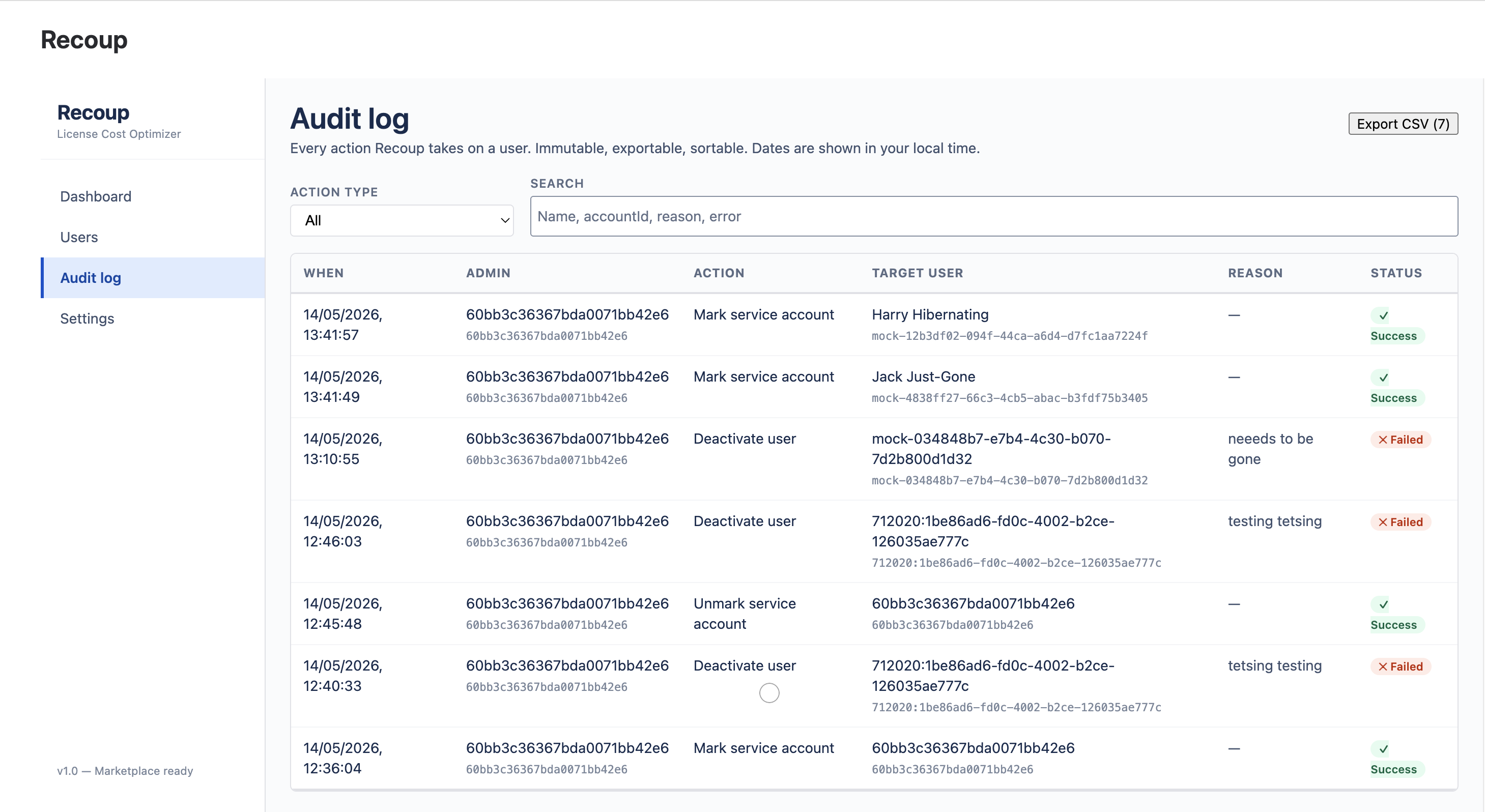
Recoup audit log with successful and failed actions, exportable as CSV 1 CSV export. Australian-formatted dates, every column finance needs. 2 Failures recorded too. Refused reclaims are audited as transparently as successful ones. 3 Free-form reason on every action. Required and immutable. Security review writes itself.
AUDIT LOG — immutable, exportable, finance-ready
How it works

Three kinds of waste.
One dashboard.

Most license-cleanup tools count inactive logins and stop there. Recoup looks at every drawer at once and tells finance the total.

01 · INACTIVE USERS

The people who left, but kept their seat.

$8 – 22 / seat / mo

An average org carries 7% of users who haven't touched any Atlassian product for more than 90 days. They're not the obvious leavers — they're the ones HR offboarded but IT never disabled.

02 · PRODUCT MISMATCH

Paying for Confluence. Living in Jira.

~12% of multi-product users

Multi-product seats where one product is dormant. The cleanest win in license optimisation — and one no inactive-user counter ever surfaces. The bigger your Atlassian stack, the more of this Recoup finds.

03 · JPD CREATOR WASTE

Creator seats parked on people who never open JPD.

$10 / Creator seat / mo

Jira Product Discovery's Creator tier is $10/mo per seat. Contributor is free. Highest per-seat reclaim Recoup detects — and uniquely available only when JPD is in your suite.

Setup & usage

Set up Recoup in minutes.

Recoup is a Forge app — it installs from the Atlassian Marketplace and runs entirely inside your Atlassian Cloud. Here is the full setup and how to use it day to day.

Set up (one-time)

  1. Install from the Atlassian Marketplace. On the Recoup listing choose Get it now and select your Jira Cloud site. You need to be a Jira or organisation admin. A 30-day free trial starts automatically.
  2. Open Recoup in Jira. Go to Apps → Recoup in the top navigation. The dashboard loads. There is no API token to paste — Recoup runs entirely on its Forge-granted access.
  3. Confirm your costs and thresholds in Settings. Cost per seat is pre-filled with Atlassian list prices; the inactivity thresholds default to conservative values — tune both to your organisation.
  4. Map product access groups in Settings → Product access groups. Point each Jira/JSM product at the Atlassian access-control group(s) that grant it. Reclaim only ever acts on the groups you map here.
  5. Allowlist your service accounts (optional) so bots and integrations are never flagged for removal.
  6. Run your first scan with Scan now on the dashboard.

Use it day to day

  1. Review the dashboard. See the total reclaimable spend in dollars, broken down by inactive users, product mismatches and JPD Creator waste, with a plain-language summary.
  2. Drill into Users. Every account shows why it is flagged, last-active dates per product, and the dollar value of each recommendation.
  3. Check the Approve queue. Seats confirmed on two consecutive scans collect here. Deselect anyone you want to keep.
  4. Approve & reclaim. Selected seats are removed from their mapped access groups under your own org-admin identity. Every reclaim is reversible — Add back restores the group membership.
  5. Export the audit log. Every action is recorded immutably and downloads to CSV for finance.
  6. Let it run. Recoup re-scans on a weekly schedule; revisit the queue to keep reclaiming.
Live calculator

How much could your org save?

A conservative model based on patterns Recoup detects in customer scans. Move the slider — the receipt updates.

Conservative model: 7% inactive (60% Jira-only · 40% multi-product) · 12% Confluence mismatch on multi-product orgs · 2% wasted JPD Creator seats when JPD is in use. Real customer savings are usually higher.

Service accounts are protected

The #1 cleanup mistake — solved.

Every license-cleanup tool gets bots wrong. Some admin cuts off a "stale" account, three integrations break, three teams lose half a day. Recoup catches it before you click — including when you're acting on fifty users at once. And every seat action is a reversible group change, not a delete: one click to Add back. Nothing leaves your Atlassian tenancy.

  1. 01Recoup flags likely service, bot, and integration accounts with rule-based detection — display-name and email-pattern signals, evaluated entirely inside Atlassian's Forge runtime.
  2. 02Flagged accounts are excluded from reclaim recommendations entirely. They get a "review" suggestion instead.
  3. 03When an admin manually reclaims a flagged account — removing it from its mapped Jira access group — the modal shows the warning above. They must acknowledge and type a reason — recorded in the audit log. And because the group change is reversible, one click to Add back undoes a mistake.
  4. 04Bulk actions get the same rails. Reclaim up to 50 unused Jira/JSM seats at once by removing users from their mapped access group — Atlassian stops billing them, one-click Add back brings any user back. The modal shows you every excluded account before you confirm. Org admins, your own account, allowlisted service accounts, and rule-flagged bots are filtered server-side. Each attempt gets its own audit entry.
  5. 05Every action — successful or refused, single or bulk — is written to an immutable audit log. CSV exportable for FP&A and security reviews.
Scheduled detection · Approve queue

Waste finds itself. You still hold the button.

Recoup re-audits every seat on a schedule and parks each reclaimable one in a single queue — but it never removes a soul. Review the list, keep anyone you want with one click, clear the rest with one more. The app detects; a human approves. Always.

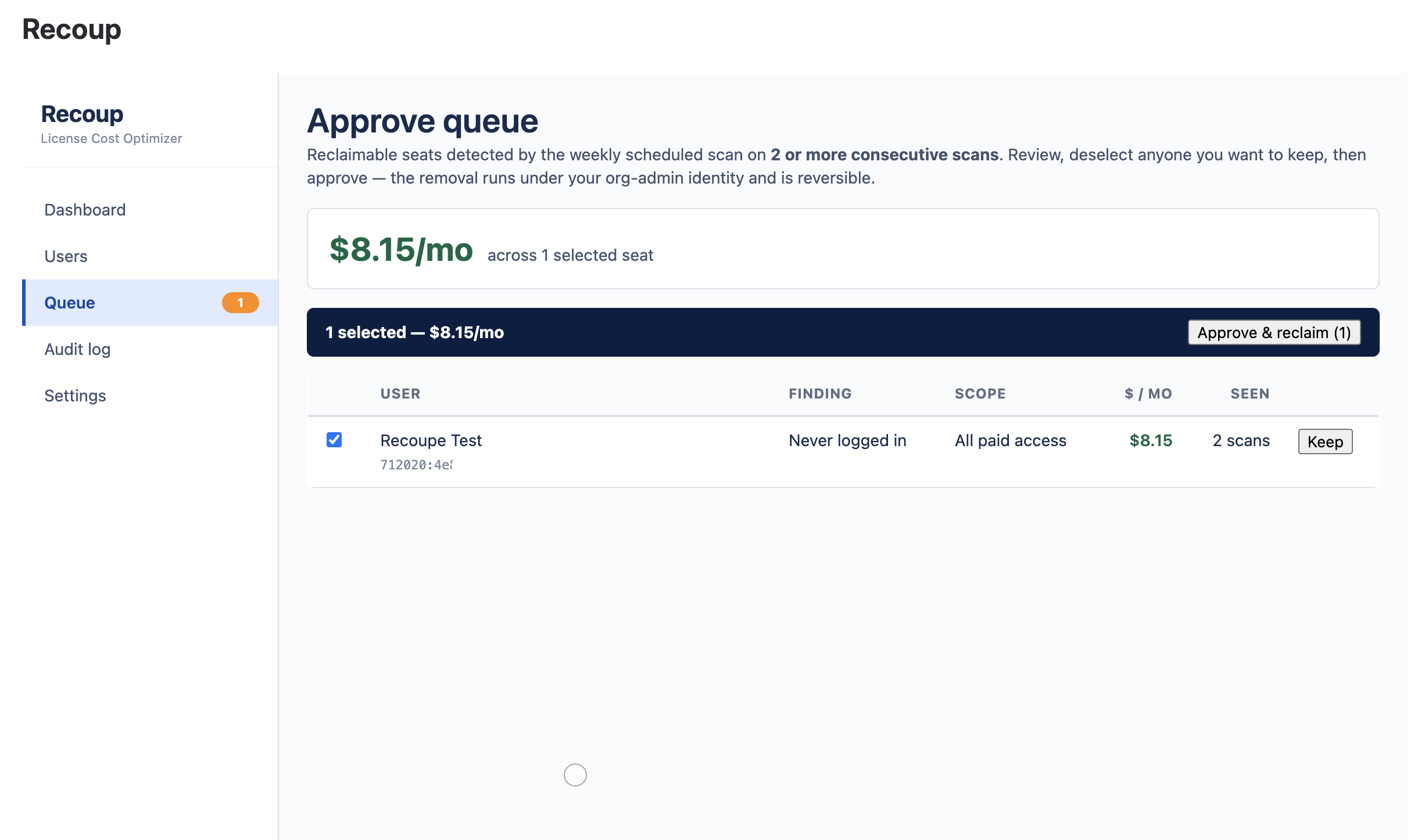
Recoup approve queue — reclaimable seats confirmed on two consecutive scans, with one-click approve and keep
THE APPROVE QUEUE — SEATS CONFIRMED WASTE ON TWO CONSECUTIVE SCANS, ONE CLICK TO RECLAIM
  1. 01Every week, on its own. A scheduled scan re-audits every seat — read-only, nothing touched. Set it once; the waste keeps surfacing itself, in dollars.
  2. 02Only what's really waste. A seat reaches the queue only after it's flagged on two consecutive scans — never a one-off blip. Each row shows the finding, the scope, and the monthly dollars.
  3. 03One click — same rails. Approve and Recoup reclaims the selected seats by removing them from their mapped Jira/JSM access group: reversible with one-click Add back, service accounts and org admins filtered server-side, every action in the audit log.
  4. 04Automation that never acts on its own. Nothing is removed until an admin opens the queue and clicks approve. No autonomous path exists — by design, and it's all in the audit log.
Security

Built like an accountant would.

Zero data egress. No third-party services. No AI vendor. Hosted by Atlassian Forge, encrypted at rest, no telemetry, immutable audit log. Nothing destructive — every seat action is a reversible Jira access-group change. The security review writes itself.

Reversible by design

Recoup never deletes, suspends, or hard-deactivates accounts. Unused Jira/JSM seats are reclaimed by removing the user from their mapped access-control group — Atlassian stops billing them — and any user is back in one click with Add back. Identity and SSO untouched.

§

Runs on Forge

Every function call and storage write stays inside Atlassian's network. No third-party SaaS, no AI vendor, no shadow IT, no data leaving your region.

No credentials collected

Recoup never asks for an Atlassian API token or password. It runs entirely on Forge-granted access (asApp / asUser) — there are no app-held credentials to leak.

Immutable audit log

Every action a Recoup admin takes is recorded with full before/after diff. CSV export, ISO + local timezone, designed for finance reviews.

No telemetry

No analytics provider, no error reporting, no marketing pixels. Cookies belong to Atlassian, not us. Read the privacy policy.

Pricing

One price. Pays for itself on day one.

The average Recoup customer reclaims about 25× the subscription cost in the first scan. Cancel any time, no rugpulls.

Recoup · Standard
$1.50
per Atlassian user · per month · USD
  • Cross-product scan engine
  • Inactive · Mismatch · JPD detectors
  • Rule-based service-account detection
  • Deterministic dashboard summary
  • Reversible bulk seat reclaim (up to 50)
  • Scheduled detection + one-click approve queue
  • Immutable audit log + CSV export
  • Forge-hosted, encrypted at rest
Start 30-day trial Need enterprise pricing?

No credit card. Atlassian volume discounts apply automatically: ~20% off at 100+ seats, ~35% off at 500+. For 5,000+ seats or annual prepay, talk to us.

FAQ

Questions our buyers ask first.

If your security team or CFO has a question that isn't here, email support@taskhooker.com — answers usually inside a few hours.

Where does my data go? +

Stays inside your Atlassian site. Recoup runs entirely on Forge, Atlassian's hosted app platform — every function call executes in Atlassian's runtime, every storage write goes to Forge KVS (AES-256 at rest, inside your Atlassian site). We operate no third-party servers.

Does any data leave Atlassian? +

No. Recoup runs entirely on Forge and reads your data only through Atlassian's own product APIs (asApp() / asUser()). The single Atlassian endpoint it calls, api.atlassian.com, is Atlassian's own service and is used only for the required end-user personal-data report — authenticated by Forge, with no credentials supplied by you. No third-party services, no AI vendor, no telemetry. End-User Data never leaves Atlassian's infrastructure.

Do we need to supply an API token or password? +

No. Recoup collects no Atlassian credentials of any kind. It reads users and last activity through Forge's built-in app access (asApp()) and reclaims seats as the signed-in admin (asUser()) — both granted by the scopes you approve at install. There is nothing to paste, rotate, or revoke.

What if Recoup wrongly recommends reclaiming a service account? +

By design, it doesn't. Any account Recoup's rule-based detection flags as a likely service, bot, or integration account is excluded from reclaim recommendations and surfaced as "review" instead. If you do manually reclaim one anyway, the confirmation modal warns you with the detection reasoning and you must type a reason that's recorded in the audit log — and because the reclaim is a fully reversible group-membership change, one-click Add back puts the account straight back in its access group. Recoup never deletes, suspends, or hard-deactivates accounts; identity and SSO are untouched.

Can I act on multiple users at once? +

Yes — bulk reclaim access is capped at 50 users per action to keep things reviewable. Reclaiming a seat removes the user from the Jira/JSM access group you mapped to that product in Settings, so Atlassian stops billing them; it is fully reversible with one-click Add back and never deletes, suspends, or hard-deactivates the account. Before you confirm, the modal shows a full preview of which users will be acted on and which are excluded (and why) — org admins, allowlisted service accounts, rule-flagged bots, and your own account are filtered server-side, not just client-side. Confluence product-mismatch and JPD Creator findings are insights-only for now — Recoup shows the dollar value and you right-size those in admin.atlassian.com. Every attempt — success, skip, or failure — generates its own audit entry.

Can I undo a reclaim? +

Yes — instantly. Every reclaimed user has a one-click Add back in Recoup that re-adds them to the same Jira access group(s) immediately. Reclaim is the reversible, safe direction by design: Atlassian stops billing a reclaimed seat, and Add back brings the user back with identity and SSO untouched. No trip to your IAM console required.

Does Recoup ever remove access on its own? +

No — and there's no code path for it to. Recoup re-scans on a schedule (read-only) and queues reclaimable seats, but nothing is removed until an admin opens the queue and clicks approve. The app detects; a human decides — always. Every approval, and every account you choose to keep, is written to the immutable audit log, and every reclaim is a reversible group change you can undo with one-click Add back.

Does Recoup support Premium and Enterprise plans? +

Yes — and Premium/Enterprise customers get the richer experience because their managed users (verified domain via Atlassian Access) return full last_active per product. Recoup detects this automatically and uses the richer data path.

Stop paying for seats no one's sitting in.

Install Recoup from the Atlassian Marketplace. First scan in under a minute. Cancel any time.

Listing pending Atlassian review — early access by email request.